机器学习 / A LEAF IN THE GARDEN
语义分割基础
机器学习 · 动手深度学习。来自 Daily Learning 的学习笔记。
简介
语义分割(Semantic segmentation),将图片中每个像素分类到对应类别
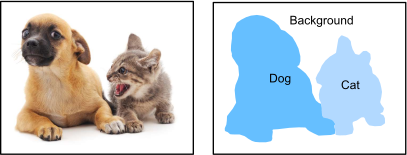
分类
- 语义分割:
- 将图片中每个像素分类到对应类别
- 不区分同一类别的不同实例
- 实例分割:
- 将图片中每个像素分类到对应实例
- 区分同一类别的不同实例
- 图像分割:
- 将图片分成不同的区域
- 不指明类别和实例,只表示相关性
实现
代码 4 · In [1]
%matplotlib inline
import os
import torch
import torchvision
import util
util.data.DATA_HUB['voc2012'] = (util.data.DATA_URL + 'VOCtrainval_11-May-2012.tar',
                           '4e443f8a2eca6b1dac8a6c57641b67dd40621a49')

voc_dir = util.data.download_extract('voc2012', 'VOCdevkit/VOC2012')
已保存输出
/root/autodl-tmp/envs/daily_learning/lib/python3.11/site-packages/requests/__init__.py:92: RequestsDependencyWarning: Unable to find acceptable character detection dependency (chardet or charset_normalizer).
  warnings.warn(
已保存输出
正在从https://d2l-data.s3-accelerate.amazonaws.com/VOCtrainval_11-May-2012.tar下载./data/VOCtrainval_11-May-2012.tar...
已保存输出 · 错误记录
---------------------------------------------------------------------------KeyboardInterrupt                         Traceback (most recent call last)Cell In[1], line 9
      5 import util
      6 util.data.DATA_HUB['voc2012'] = (util.data.DATA_URL + 'VOCtrainval_11-May-2012.tar',
      7                            '4e443f8a2eca6b1dac8a6c57641b67dd40621a49')
      8
----> 9 voc_dir = util.data.download_extract('voc2012', 'VOCdevkit/VOC2012')
File ~/autodl-tmp/sync/Daily_Learning/机器学习自学/动手深度学习/util/data.py:97, in download_extract(name, folder)
     95 def download_extract(name, folder=None):
     96     """下载并解压 zip/tar 文件"""
---> 97     fname = download(name)
     98     base_dir = os.path.dirname(fname)
     99     data_dir, ext = os.path.splitext(fname)
File ~/autodl-tmp/sync/Daily_Learning/机器学习自学/动手深度学习/util/data.py:92, in download(name, cache_dir)
     90 r = requests.get(url, stream=True)
     91 with open(fname, 'wb') as f:
---> 92     f.write(r.content)
     93 return fname
File ~/autodl-tmp/envs/daily_learning/lib/python3.11/site-packages/requests/models.py:1042, in Response.content(self)
   1040         self._content = None
   1041     else:
-> 1042         self._content = b"".join(self.iter_content(CONTENT_CHUNK_SIZE)) or b""
   1044 self._content_consumed = True
   1045 # don't need to release the connection; that's been handled by urllib3
   1046 # since we exhausted the data.
File ~/autodl-tmp/envs/daily_learning/lib/python3.11/site-packages/requests/models.py:937, in Response.iter_content.<locals>.generate()
    935 if hasattr(self.raw, "stream"):
    936     try:
--> 937         yield from self.raw.stream(chunk_size, decode_content=True)
    938     except ProtocolError as e:
    939         raise ChunkedEncodingError(e)
File ~/autodl-tmp/envs/daily_learning/lib/python3.11/site-packages/urllib3/response.py:1267, in HTTPResponse.stream(self, amt, decode_content)
   1261 else:
   1262     while (
   1263         not is_fp_closed(self._fp)
   1264         or len(self._decoded_buffer) > 0
   1265         or (self._decoder and self._decoder.has_unconsumed_tail)
   1266     ):
-> 1267         data = self.read(amt=amt, decode_content=decode_content)
   1269         if data:
   1270             yield data
File ~/autodl-tmp/envs/daily_learning/lib/python3.11/site-packages/urllib3/response.py:1110, in HTTPResponse.read(self, amt, decode_content, cache_content)
   1107     if len(self._decoded_buffer) >= amt:
   1108         return self._decoded_buffer.get(amt)
-> 1110 data = self._raw_read(amt)
   1111 if not cache_content:
   1112     self._uncached_read_occurred = True
File ~/autodl-tmp/envs/daily_learning/lib/python3.11/site-packages/urllib3/response.py:1022, in HTTPResponse._raw_read(self, amt, read1)
   1019 fp_closed = getattr(self._fp, "closed", False)
   1021 with self._error_catcher():
-> 1022     data = self._fp_read(amt, read1=read1) if not fp_closed else b""
   1023     if amt is not None and amt != 0 and not data:
   1024         # Platform-specific: Buggy versions of Python.
   1025         # Close the connection when no data is returned
   (...)   1030         # not properly close the connection in all cases. There is
   1031         # no harm in redundantly calling close.
   1032         self._fp.close()
File ~/autodl-tmp/envs/daily_learning/lib/python3.11/site-packages/urllib3/response.py:1005, in HTTPResponse._fp_read(self, amt, read1)
   1002     return self._fp.read1(amt) if amt is not None else self._fp.read1()
   1003 else:
   1004     # StringIO doesn't like amt=None
-> 1005     return self._fp.read(amt) if amt is not None else self._fp.read()
File ~/autodl-tmp/envs/daily_learning/lib/python3.11/http/client.py:478, in HTTPResponse.read(self, amt)
    475 if self.length is not None and amt > self.length:
    476     # clip the read to the "end of response"
    477     amt = self.length
--> 478 s = self.fp.read(amt)
    479 if not s and amt:
    480     # Ideally, we would raise IncompleteRead if the content-length
    481     # wasn't satisfied, but it might break compatibility.
    482     self._close_conn()
File ~/autodl-tmp/envs/daily_learning/lib/python3.11/socket.py:718, in SocketIO.readinto(self, b)
    716 while True:
    717     try:
--> 718         return self._sock.recv_into(b)
    719     except timeout:
    720         self._timeout_occurred = True
File ~/autodl-tmp/envs/daily_learning/lib/python3.11/ssl.py:1314, in SSLSocket.recv_into(self, buffer, nbytes, flags)
   1310     if flags != 0:
   1311         raise ValueError(
   1312           "non-zero flags not allowed in calls to recv_into() on %s" %
   1313           self.__class__)
-> 1314     return self.read(nbytes, buffer)
   1315 else:
   1316     return super().recv_into(buffer, nbytes, flags)
File ~/autodl-tmp/envs/daily_learning/lib/python3.11/ssl.py:1166, in SSLSocket.read(self, len, buffer)
   1164 try:
   1165     if buffer is not None:
-> 1166         return self._sslobj.read(len, buffer)
   1167     else:
   1168         return self._sslobj.read(len)
KeyboardInterrupt:
读入内存
代码 6
def read_voc_images(voc_dir, is_train=True):
    """读取VOC数据集中的图像和标签"""
    txt_fname = os.path.join(voc_dir, 'ImageSets', 'Segmentation',
                             'train.txt' if is_train else 'val.txt')
    mode = torchvision.io.image.ImageReadMode.RGB
    with open(txt_fname, 'r') as f:
        images = f.read().split()
    features, labels = [], []
    for i, fname in enumerate(images):
        features.append(torchvision.io.read_image(os.path.join(
            voc_dir, 'JPEGImages', f'{fname}.jpg')))
        labels.append(torchvision.io.read_image(os.path.join( # label 也是图片,每个像素的值是类别索引
            voc_dir, 'SegmentationClass' ,f'{fname}.png'), mode))
    return features, labels

train_features, train_labels = read_voc_images(voc_dir, True)
检查图片格式
代码 8
n = 5
imgs = train_features[:n] + train_labels[:n]
imgs = [img.permute(1,2,0) for img in imgs]
util.show_images(imgs, 2, n)
标号映射
代码 10
VOC_COLORMAP = [[0, 0, 0], [128, 0, 0], [0, 128, 0], [128, 128, 0],
                [0, 0, 128], [128, 0, 128], [0, 128, 128], [128, 128, 128],
                [64, 0, 0], [192, 0, 0], [64, 128, 0], [192, 128, 0],
                [64, 0, 128], [192, 0, 128], [64, 128, 128], [192, 128, 128],
                [0, 64, 0], [128, 64, 0], [0, 192, 0], [128, 192, 0],
                [0, 64, 128]]

VOC_CLASSES = ['background', 'aeroplane', 'bicycle', 'bird', 'boat',
               'bottle', 'bus', 'car', 'cat', 'chair', 'cow',
               'diningtable', 'dog', 'horse', 'motorbike', 'person',
               'potted plant', 'sheep', 'sofa', 'train', 'tv/monitor']
代码 11
def voc_colormap2label():
    """建立从RGB到类别索引的映射"""
    def hashing(colormap):
        return (colormap[0] * 256 + colormap[1]) * 256 + colormap[2]
    colormap2label = torch.zeros(256 ** 3, dtype=torch.uint8) # 存储每个颜色对应的类别索引
    for i, colormap in enumerate(VOC_COLORMAP):
        colormap2label[hashing(colormap)] = i # 将每个颜色映射到对应的类别索引
    return colormap2label

def voc_label_indices(colormap, colormap2label):
    """将彩色标签映射到类别索引"""
    def hashing(colormap):
        return (colormap[:, :, 0] * 256 + colormap[:, :, 1]) * 256 + colormap[:, :, 2]
    colormap = colormap.permute(1, 2, 0).numpy().astype('int32') # 将通道维度移到最后
    idx = hashing(colormap) # 将RGB映射到整数
    return colormap2label[idx] # 返回类别索引
例如
代码 13
y = voc_label_indices(train_labels[0], voc_colormap2label())
y[105:115, 130:140], VOC_CLASSES[1] # 显示某个区域类别索引(1)和类别名称(aeroplane)
随机剪裁的图像增广,还需要同样剪裁标签
代码 15
def voc_rand_crop(feature, label, height, width):
    """随机裁剪图像和标签"""
    # get_params 返回裁剪窗口的左上角坐标和高宽
    rect = torchvision.transforms.RandomCrop.get_params(feature, (height, width))
    # 通用的参数裁剪图像和标签
    feature = torchvision.transforms.functional.crop(feature, *rect)
    label = torchvision.transforms.functional.crop(label, *rect)
    return feature, label
代码 16
imgs = []
for _ in range(n):
    imgs += voc_rand_crop(train_features[0], train_labels[0], 200, 300)
imgs = [img.permute(1,2,0) for img in imgs]
util.show_images(imgs[::2]+imgs[1::2], 2, n) # 显示裁剪后的图像和标签
自定义数据集类
代码 18
class VOCSegDataset(torch.utils.data.Dataset):
    """VOC语义分割数据集"""
    def __init__(self, is_train: bool, crop_size: tuple[int, int], voc_dir: str):
        self.transform = torchvision.transforms.Normalize(mean=[0.485, 0.456, 0.406],
                                                          std=[0.229, 0.224, 0.225]) # ImageNet 标准
        self.crop_size = crop_size
        features, labels = read_voc_images(voc_dir, is_train)
        self.features = [self.normalize_image(feat) for feat in self.filter(features)]
        self.labels = self.filter(labels)
        self.colormap2label = voc_colormap2label()
        print(f'read {len(self.features)} examples')

    def normalize_image(self, img):
        """标准化图像"""
        return self.transform(img.float())

    def filter(self, imgs):
        """过滤掉小于裁剪尺寸的图像"""
        return [img for img in imgs if (img.shape[1] >= self.crop_size[0] and
                                        img.shape[2] >= self.crop_size[1])]

    def __getitem__(self, idx):
        """返回裁剪后的图像和标签"""
        feature, label = voc_rand_crop(self.features[idx], self.labels[idx],
                                       *self.crop_size)
        return feature.float(), voc_label_indices(label, self.colormap2label)

    def __len__(self):
        """返回数据集大小"""
        return len(self.features)
读取数据集
代码 20
crop_size = (320, 480)
voc_train = VOCSegDataset(is_train=True, crop_size=crop_size, voc_dir=voc_dir)
voc_test = VOCSegDataset(is_train=False, crop_size=crop_size, voc_dir=voc_dir)
代码 21
train_iter = torch.utils.data.DataLoader(voc_train, batch_size=64, shuffle=True, drop_last=True, num_workers=0)
for X, Y in train_iter:
    print(X.shape)
    print(Y.shape)
    break
整合所有组件
代码 23
def load_data_voc(batch_size, crop_size):
    """加载VOC数据集"""
    voc_dir = util.data.download_extract('voc2012', 'VOCdevkit/VOC2012')
    train_iter = torch.utils.data.DataLoader(
        VOCSegDataset(True, crop_size, voc_dir),
        batch_size=batch_size,
        shuffle=True,
        drop_last=True,
        num_workers=util.data.get_dataloader_workers())
    test_iter = torch.utils.data.DataLoader(
        VOCSegDataset(False, crop_size, voc_dir),
        batch_size=batch_size,
        drop_last=True,
        num_workers=0)
    return train_iter, test_iter